

Kabelsalat
A live rack for Linux. Plug in instruments, wire them up, play.
Synths, guitars and effects sit in a rack, connected by patch cables you can see and grab, with adaptive instrument consoles and a full live mixer.
- Rust
- CLAP & LV2
- egui
- MCP
- AppImage
- Linux
- MIT
Overview
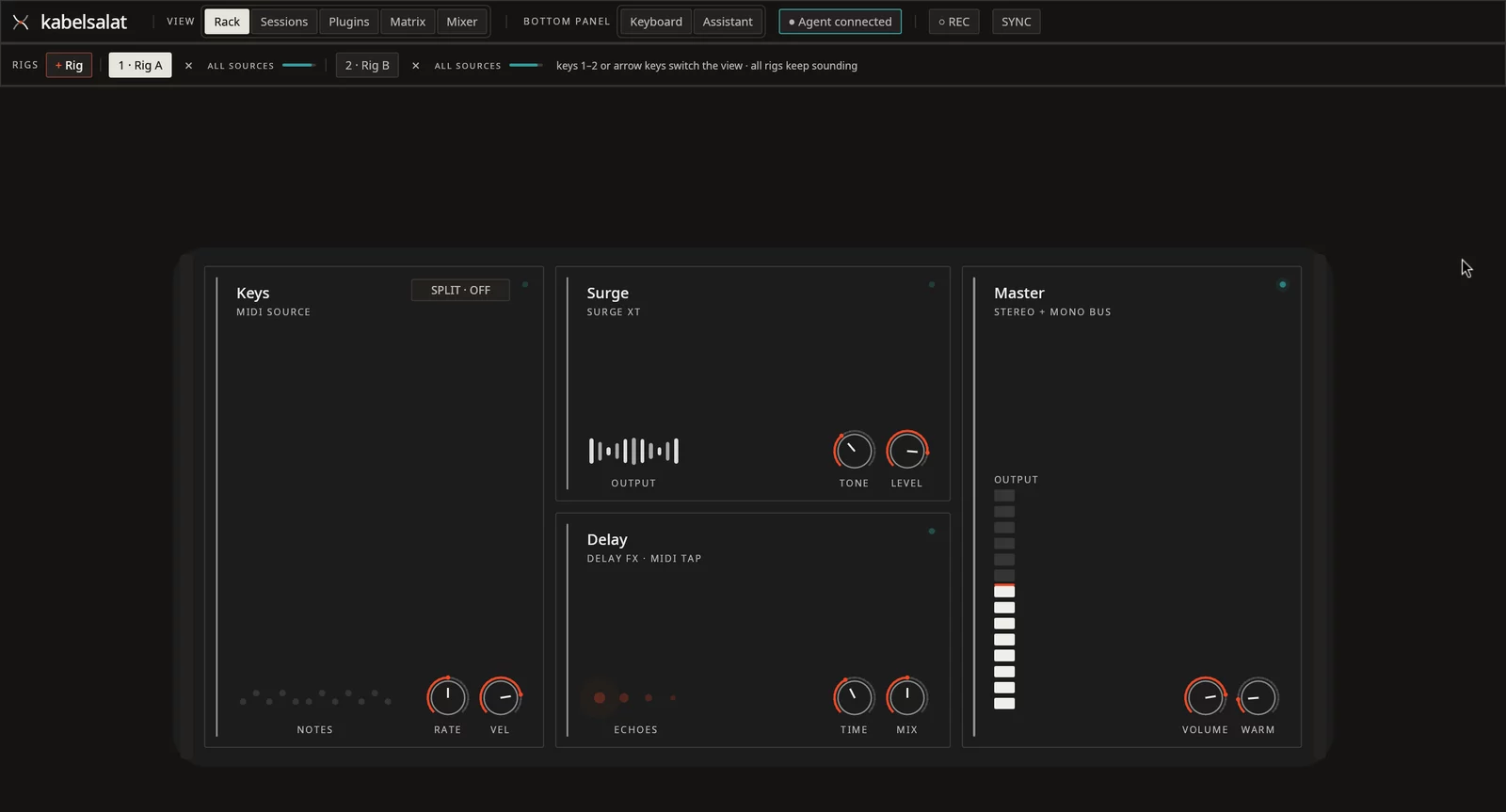
A rack you patch with visible cables
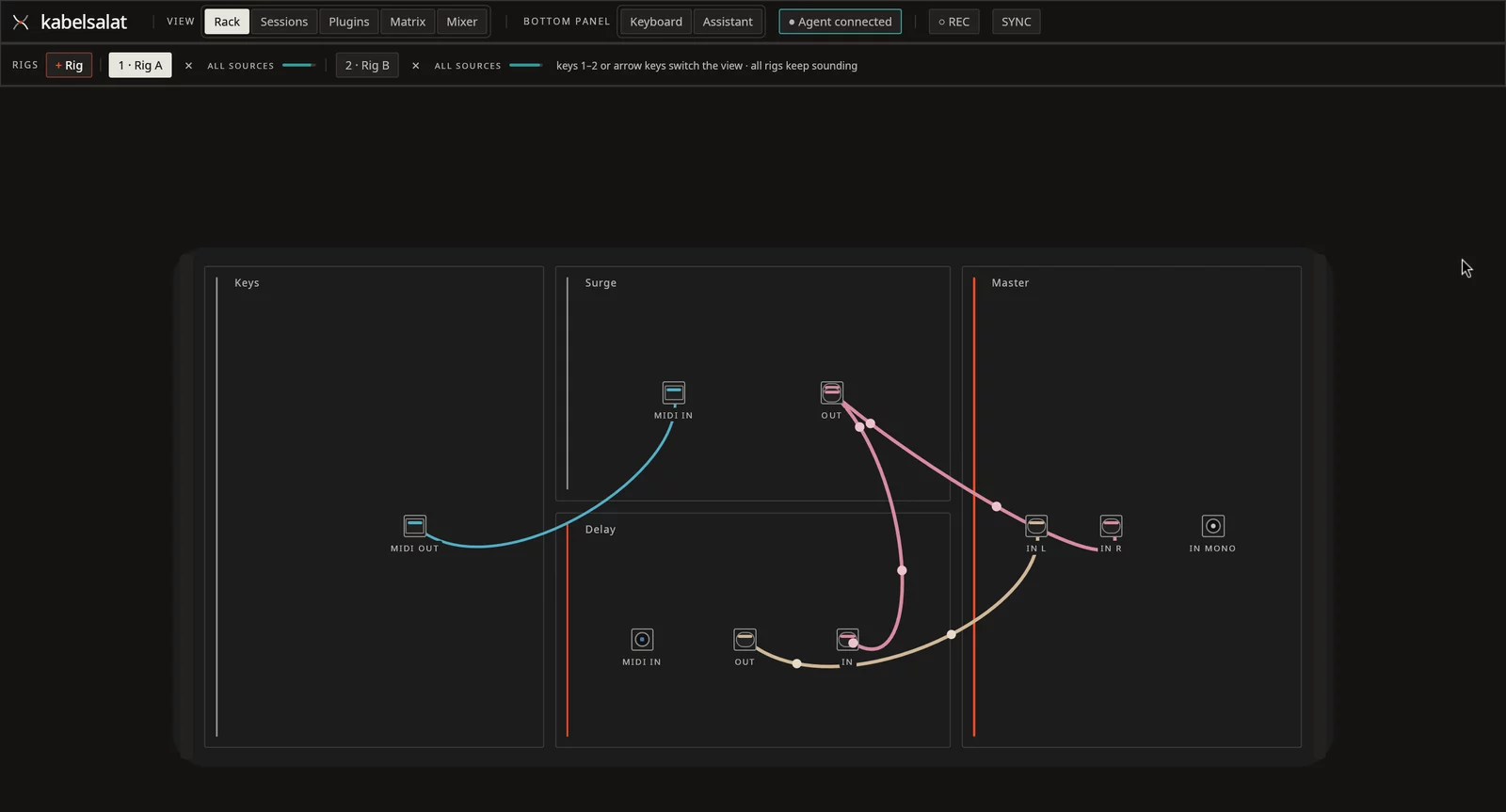
Kabelsalat is German for "cable salad", the tangle of cables behind a desk. The app draws every connection as a cable you can drag.
It turns your computer into a live setup like the ones built with AUM on the iPad. Several setups, called rigs, can sound at once, each played from its own keyboard, guitar input or controller.
Linux already has plugin hosts such as Element and Carla, but their interfaces are dated. Kabelsalat treats the interface as a core requirement.
Instant sound
Open the app and play with the laptop keyboard or adaptive on-screen consoles. No setup screen first.
Visible routing
Every connection is a physics-simulated cable that lights up when signal flows through it.
Full live mixer
Channel strips, aux sends, loudness targets, delay compensation, system audio and per-bus sound cards.
Agent-ready
Every UI action is also a tool for the OpenRouter assistant and MCP clients, including an audio judge.
Try it · Mockup 1
Repatch the rack
A small copy of the rack's back. Drag a plug to another jack to repatch, or pull it off to unplug. The cables sag and swing, and they light up while signal flows.
This toy runs in your browser and makes no sound. The real app simulates its cables the same way and plays through your audio interface.
Try it · Mockup 2
Play the instrument consoles
In Kabelsalat, pressing V (or Shift+V for full-window mode) turns the on-screen keyboard into the instrument you are playing. Switch surfaces below, pull drawbars, draw stops, drag the synth X/Y pad or audition a chord.
Simplified browser preview using Web Audio. In Kabelsalat, these controls drive real CLAP and LV2 engines such as setBfree, Aeolus and Surge XT at low latency.
Features
What you can do
Everything needed for a live Linux rig: adaptive playable surfaces, visible cable patching, guitar monitoring, a full studio mixer and agent control.
Adaptive instrument consoles
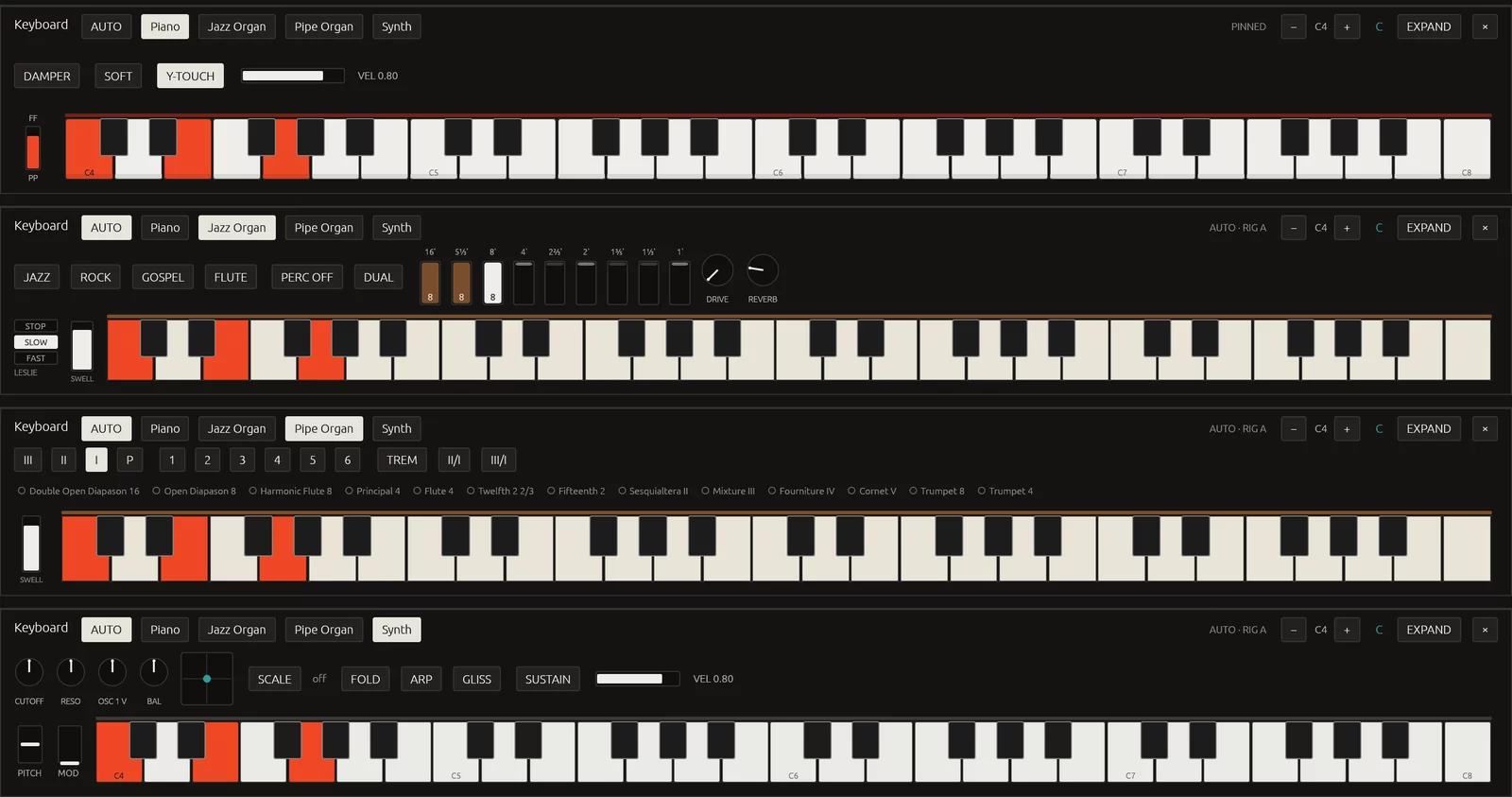
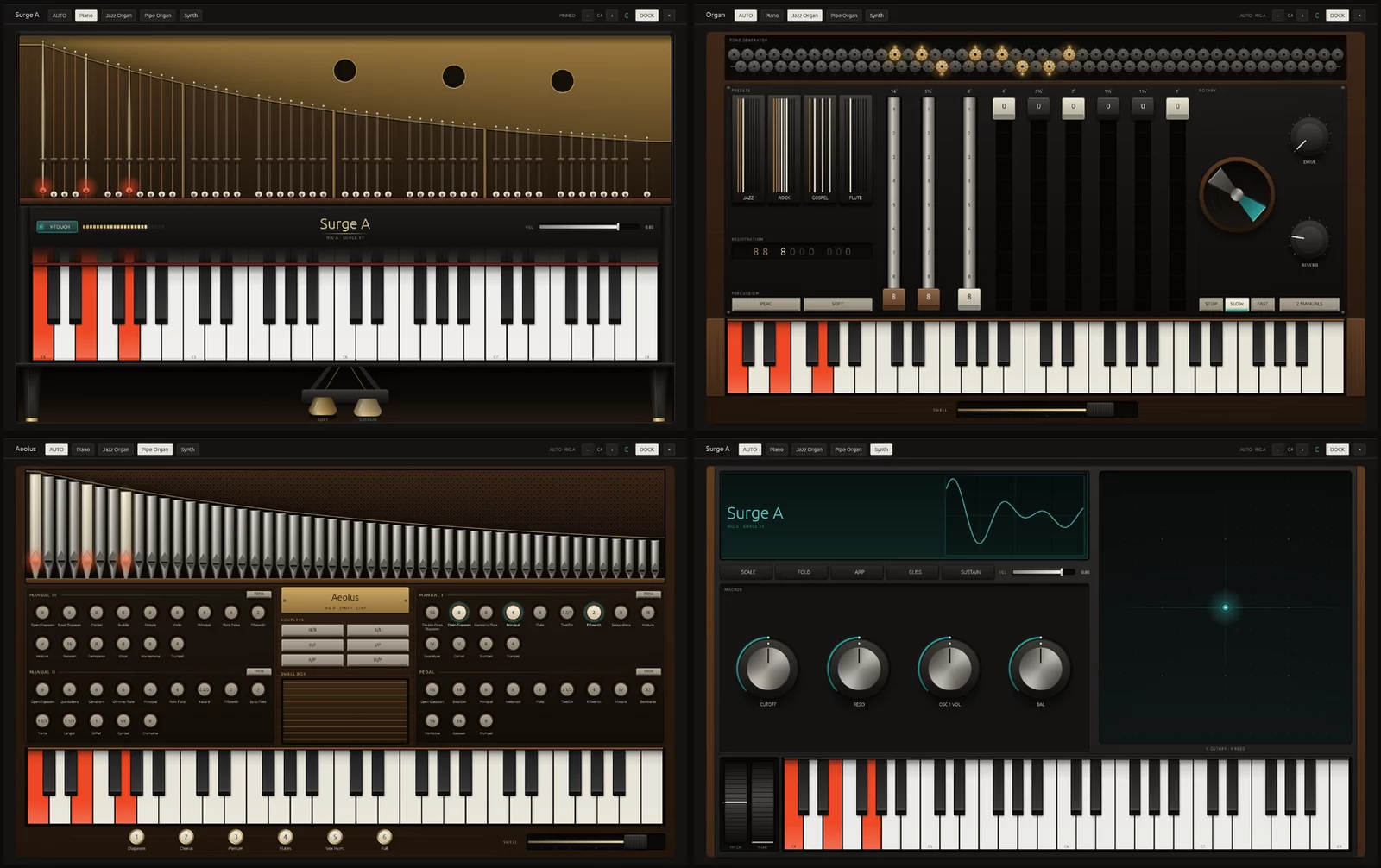
Open the app and play with your laptop keyboard, any USB MIDI keyboard (hot-plugged automatically), or the on-screen keyboard (V), which reshapes itself to match the active instrument: Piano (damper/soft pedals, touch velocity), Jazz Organ (9 drawbars, Leslie, two manuals), Pipe Organ (stops, couplers, pistons, swell) or Synth (wheels, macro knobs, X/Y pad, scale FOLD and arpeggiator).
Press Shift+V for EXPAND: the whole window becomes the instrument — moving piano hammers and strings, glowing tonewheels and spinning Leslie, speaking organ pipes, or a full synth scope.
Patch cables & MIDI strips
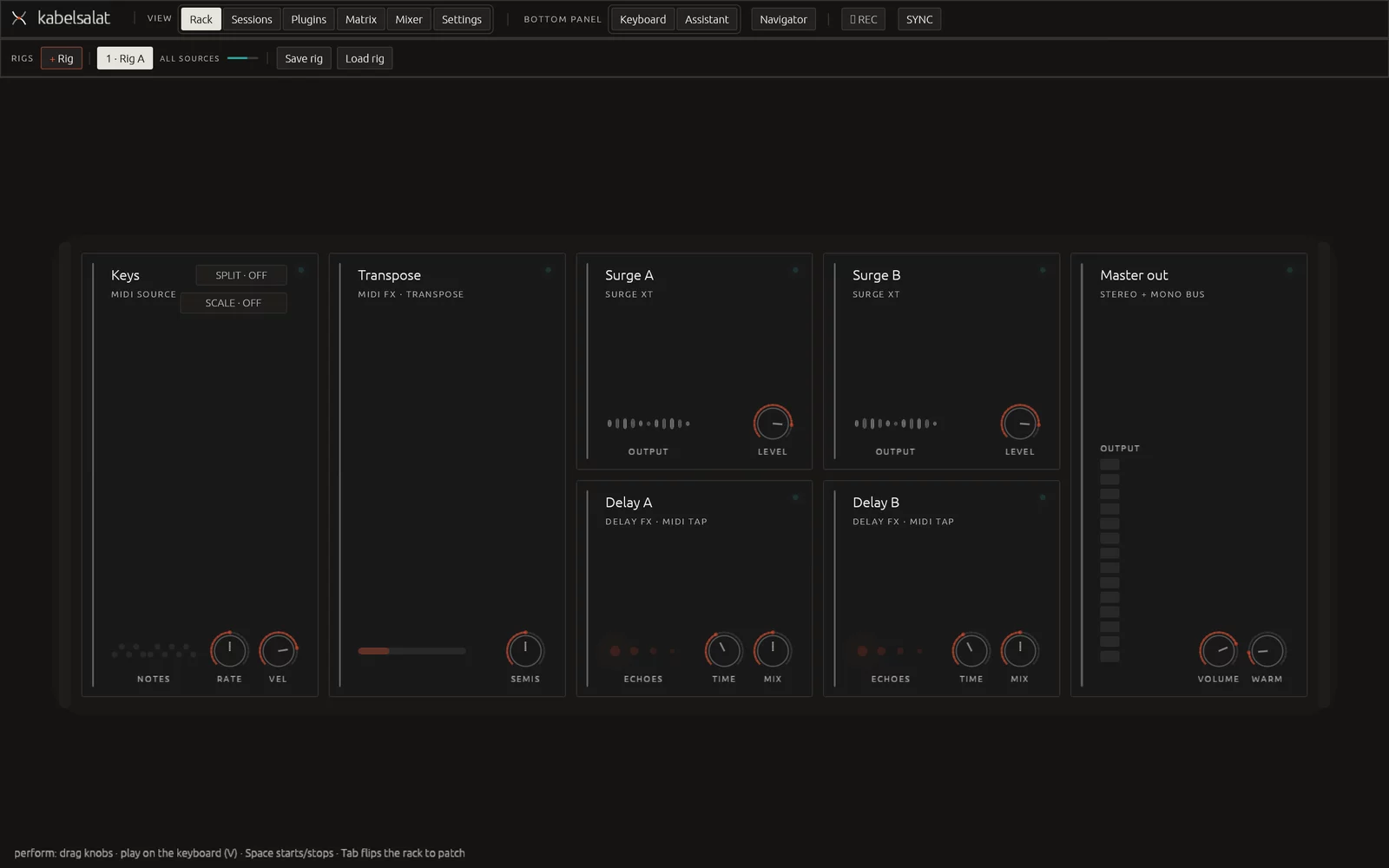
Press Tab to turn the rack around and patch on the back. Drag from jack to jack to connect, drag a plug to move it, or pull it off to unplug. + Rig adds independent setups that all sound together (1–9).
Put a MIDI strip between your keys and an instrument — built-in transpose, arpeggiator, chord mode and scale snap, or any LV2 MIDI FX such as the 36 x42 MIDI filters — without ever leaving stuck notes.
Play your guitar with a built-in tuner
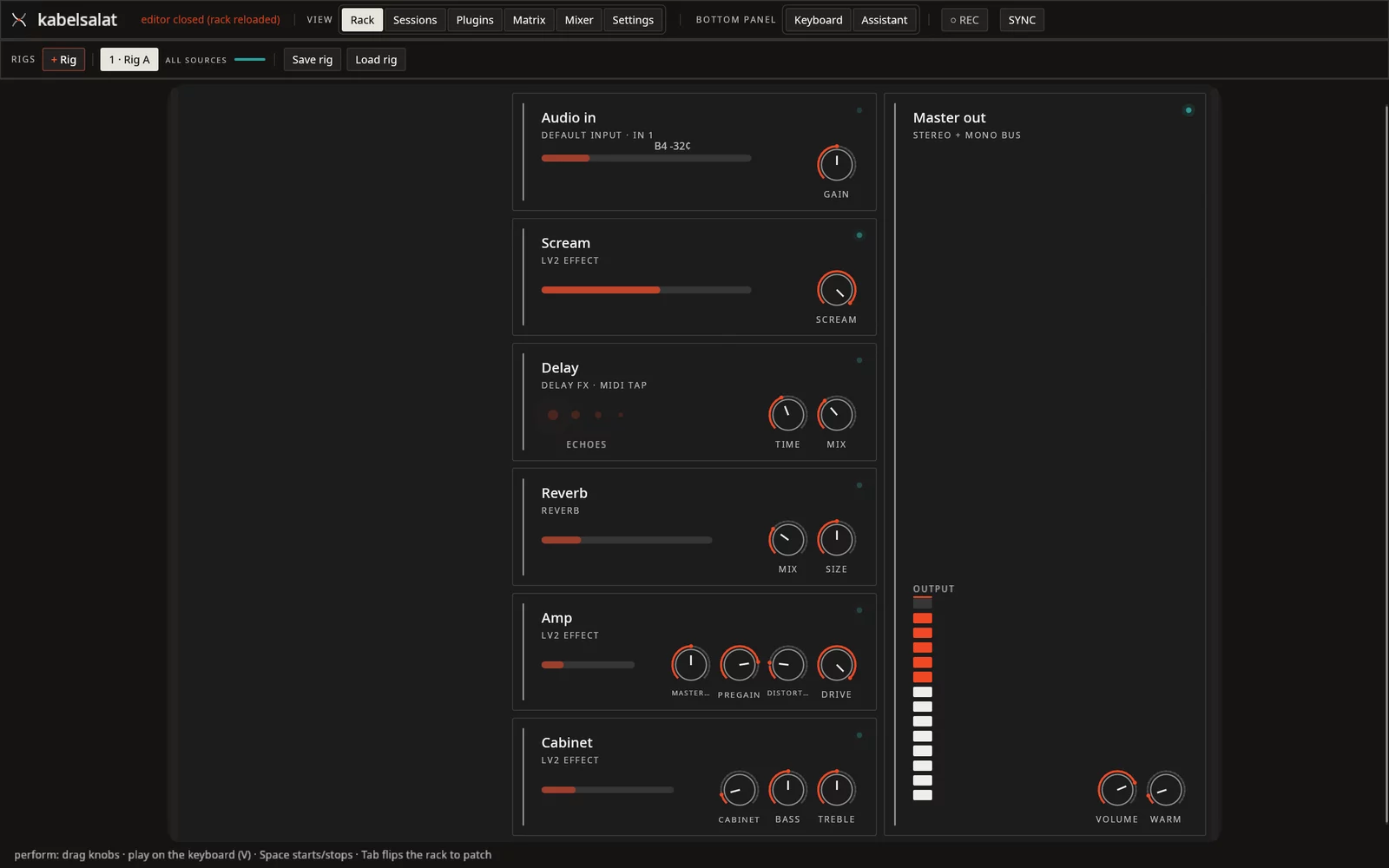
Plug a guitar or microphone into your audio interface and press Shift+F5: the Guitar rig wires Audio In → Scream → Delay → Reverb → Amp → Cabinet → Master using the Guitarix LV2 suite.
The Audio In unit selects inputs by name, shows a live meter and a built-in chromatic tuner (note and cents) on its face, and monitors through the same low-latency path as every synth. A missing input says so instead of falling back to the laptop mic.
Studio mixer, aux sends, loudness & PDC
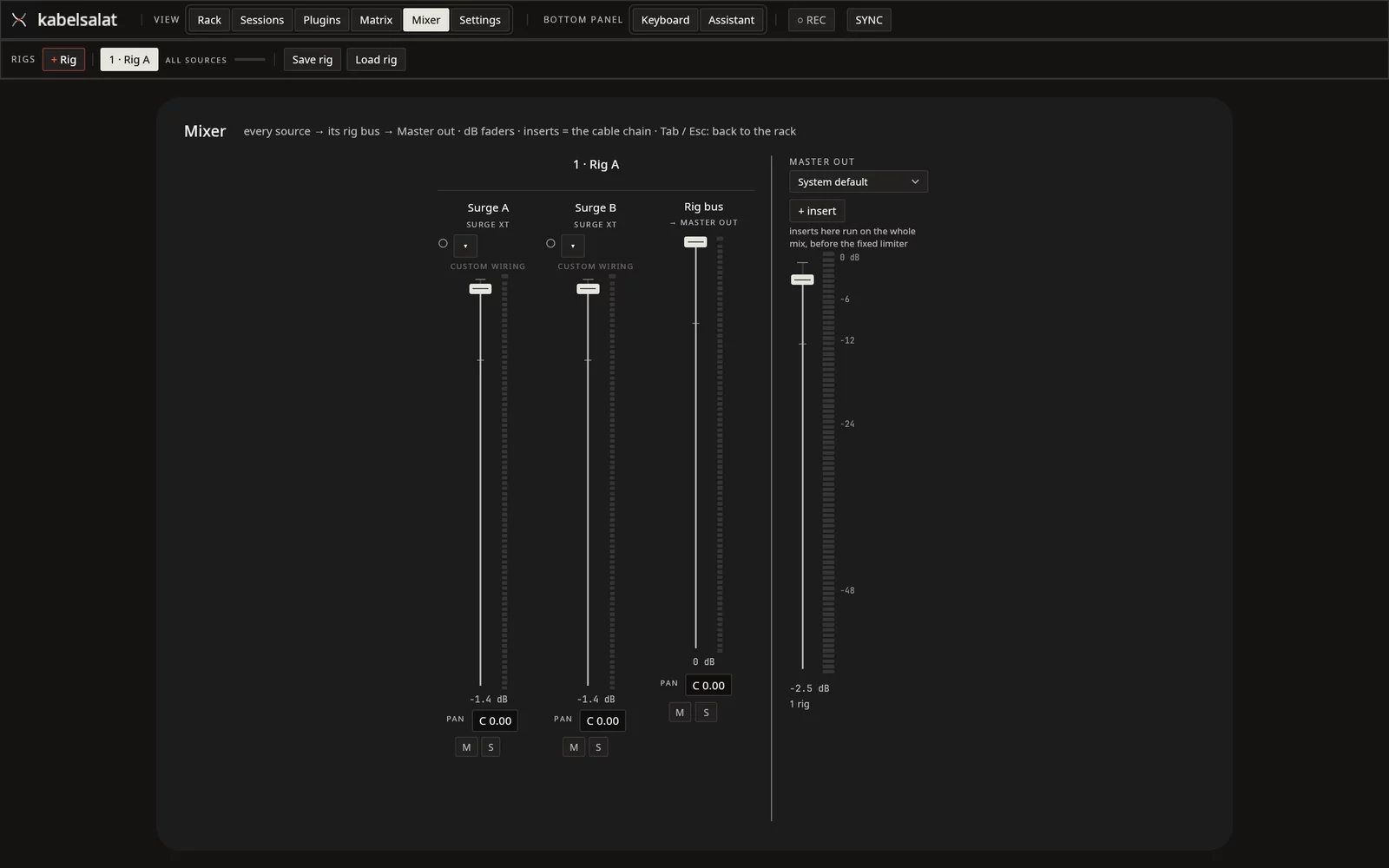
Every source gets a channel strip with dB faders (0 dB detent), peak hold, pan, mute, solo, insert slots (including CLAP audio effects and master inserts), custom colours and a quick parameter knob per slot.
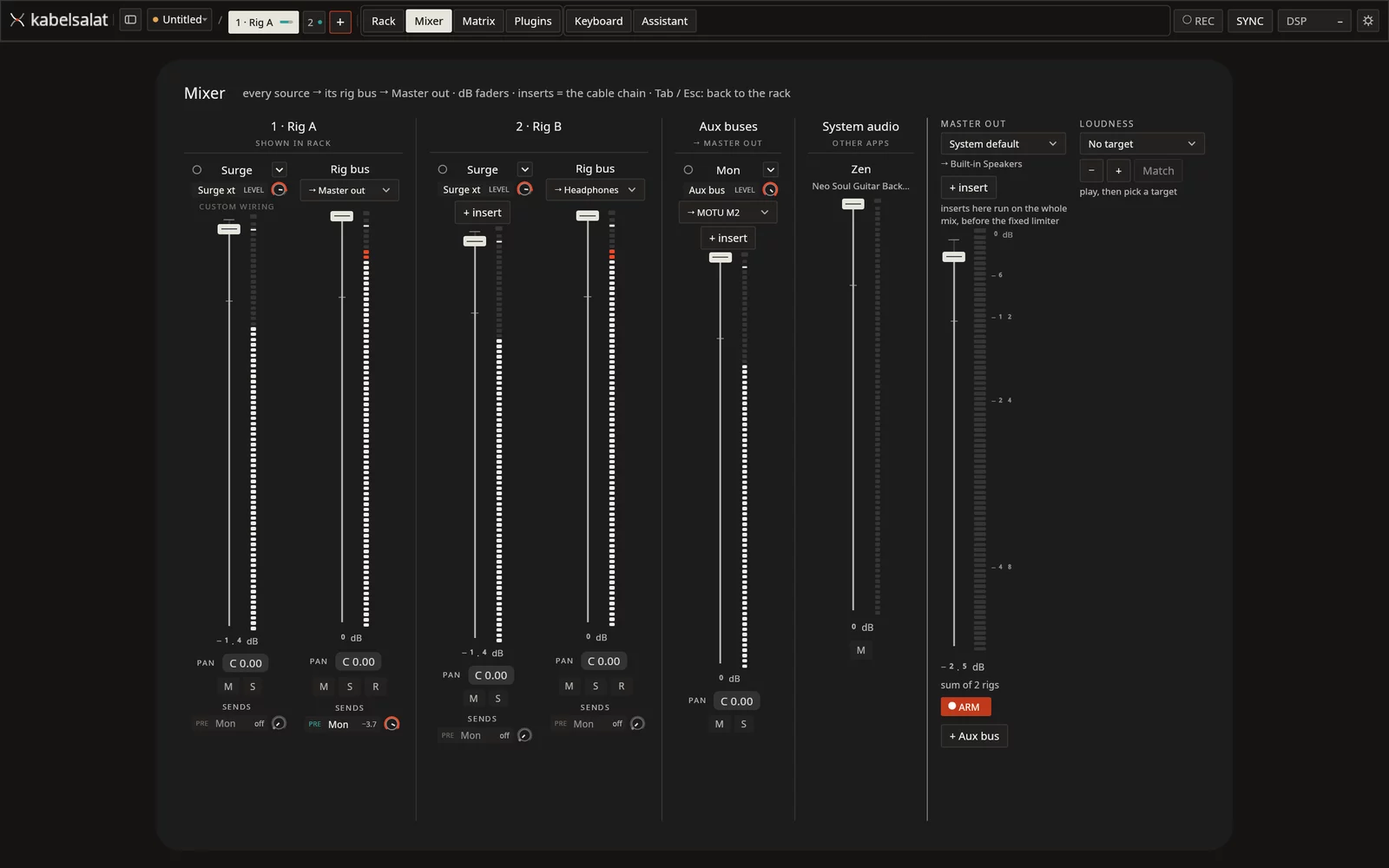
+ Aux bus shares a reverb or delay across rigs via post- or PRE-fader sends. Set a Loudness target (−14 / −16 / −8 LUFS, true peak under −1 dBTP) beside Master out, and automatic Plugin Delay Compensation keeps parallel paths phase-aligned with a millisecond readout under each delayed strip.
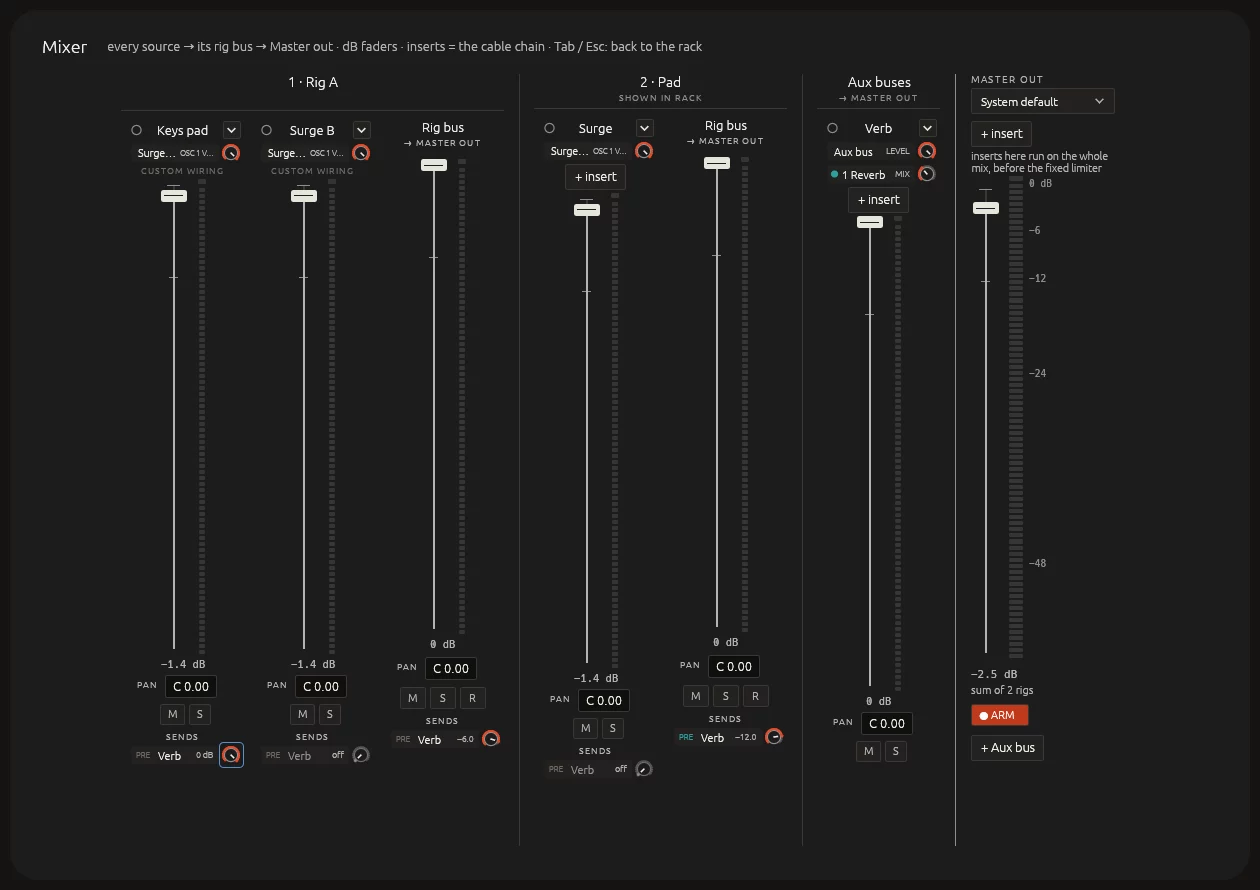
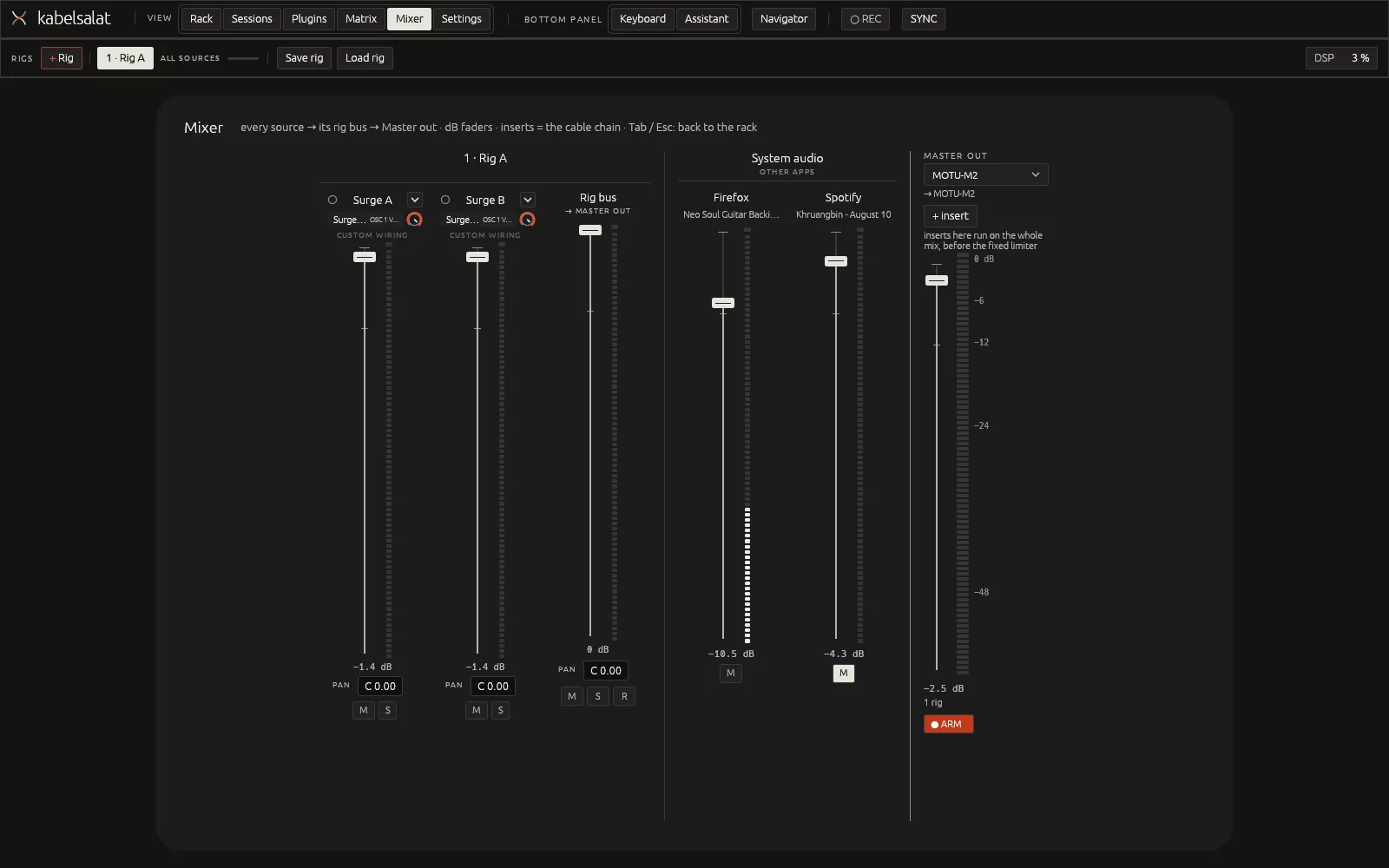
Mix system audio & route buses to separate sound cards
Under System audio, playing apps like Firefox or Spotify get their own strips with meters, faders and mute, so you can balance a backing track without leaving Kabelsalat. Switch your Master out sound card live with zero dropouts.
Need a click or monitor mix in headphones? Send any rig bus or aux bus to its own sound card (up to four extra cards alongside Master out). Unplugged cards stay silent instead of leaking to the PA, and resume when reconnected.
MIDI matrix, mixer learn, profiles & clock
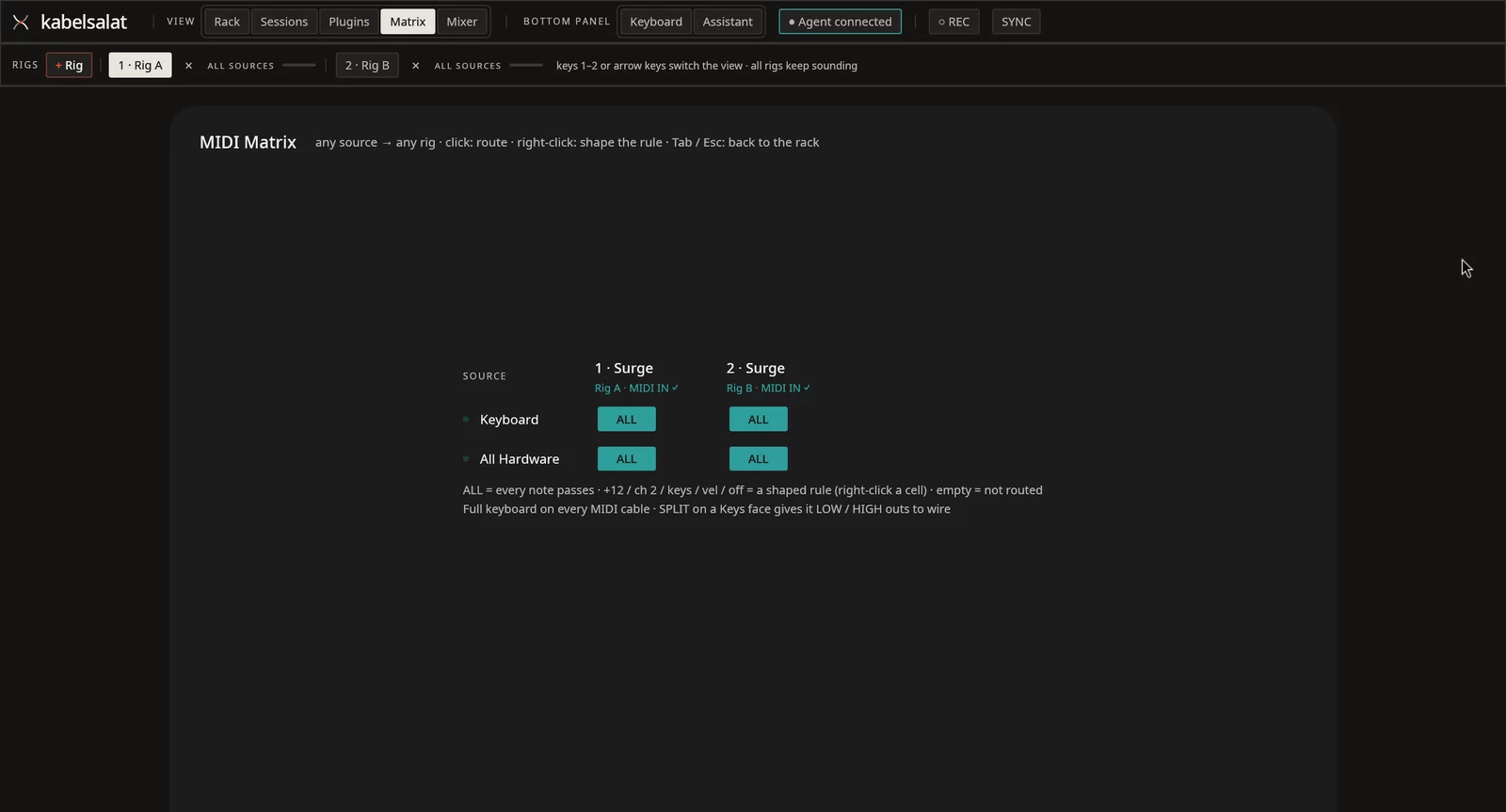
The MIDI matrix routes any keyboard to any rig with per-cell key splits, channels, transpose and velocity ranges, plus master MIDI Clock Send (24 PPQN + Start/Stop + latency compensation) for external gear.
Right-click any rack knob, mixer fader, pan, send, mute or solo button and move a hardware control to bind it (with blue outlines and range limits). Whole hardware keyboards map in one click via instrument profiles (Nord Electro 2 built in; add MIDI Guide CSV files to ~/.config/kabelsalat/instruments/).
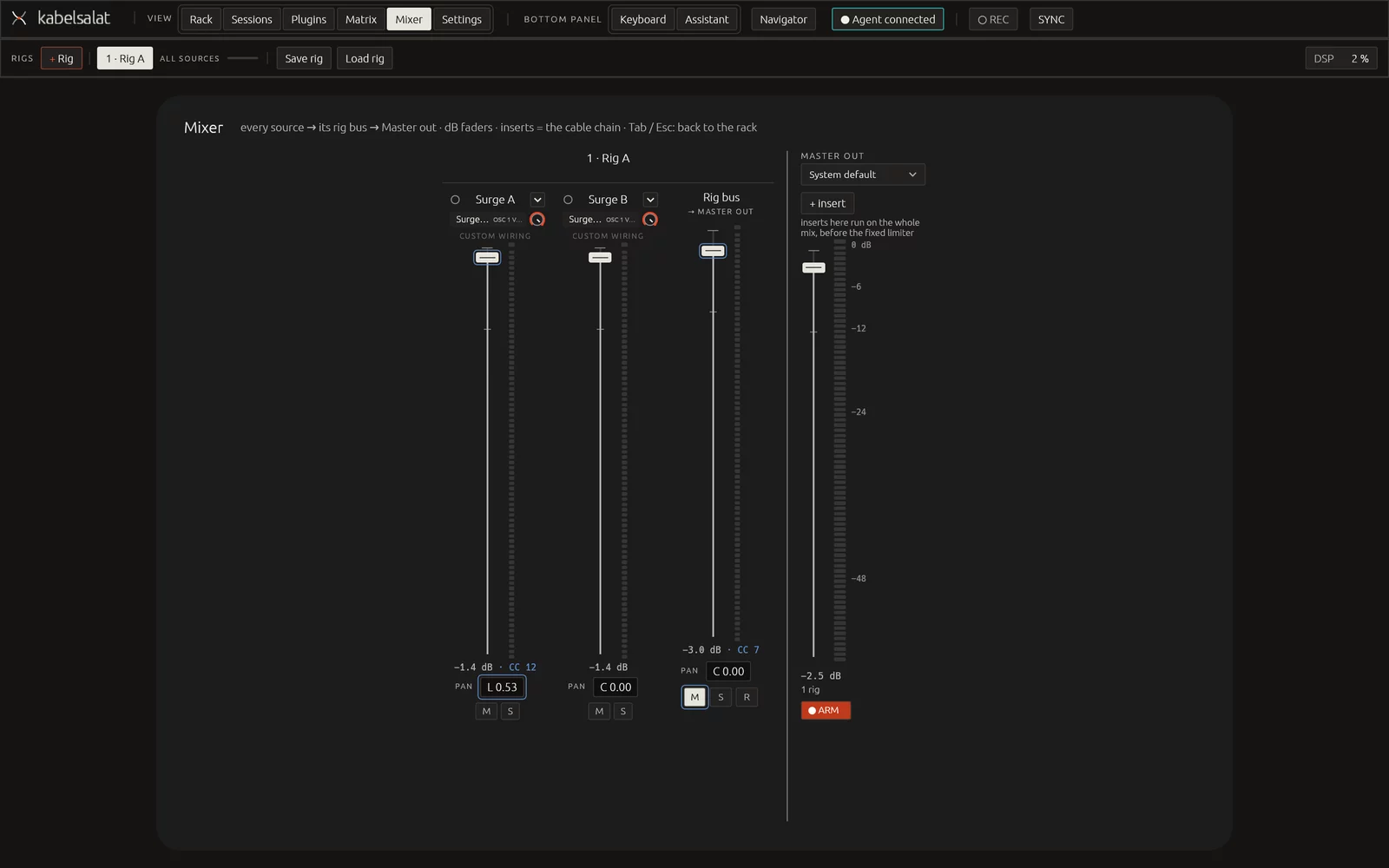
Time signatures, stem recording & backing tracks
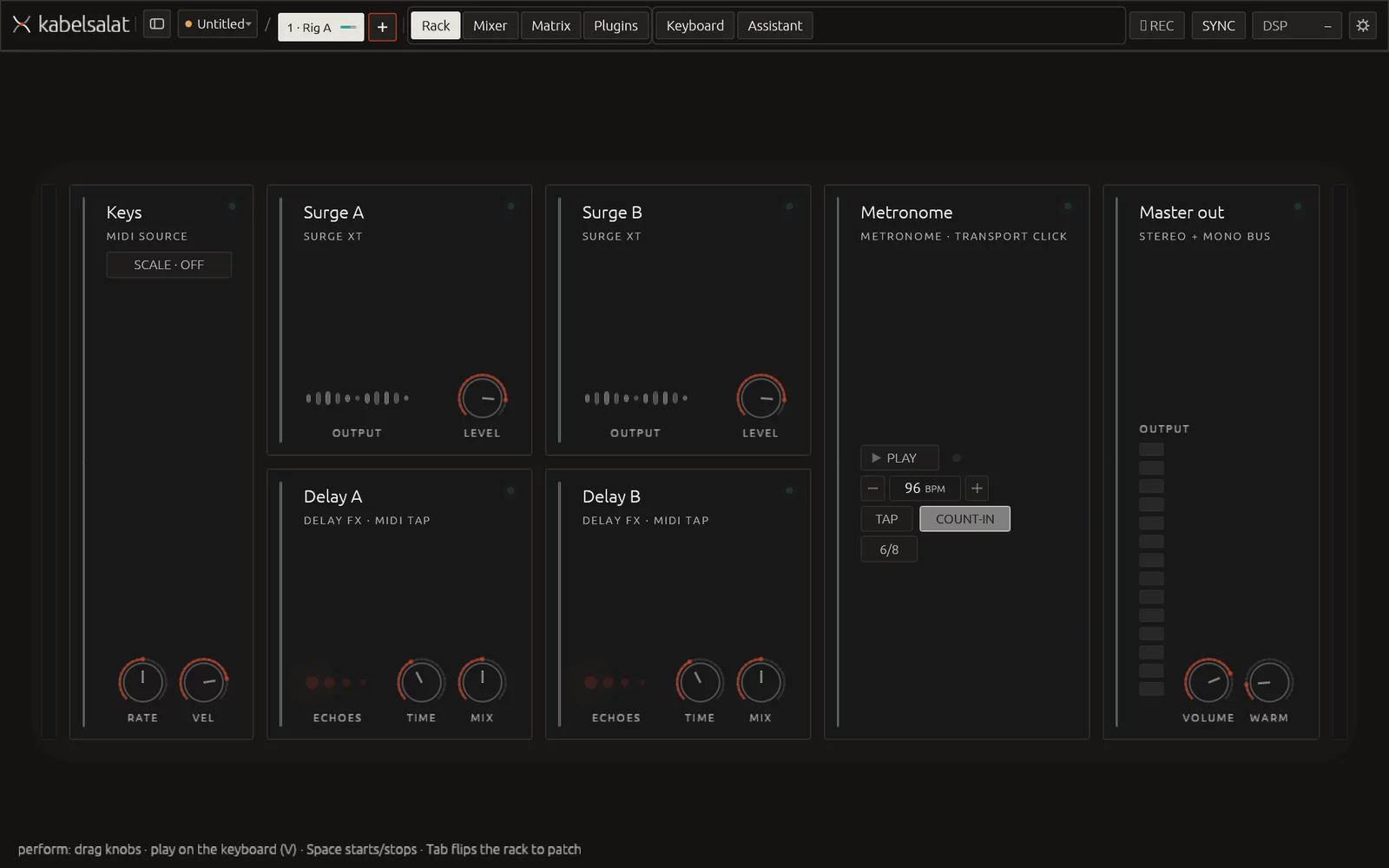
Step the metronome through 4/4, 3/4, 6/8, 5/4, 7/8 and 2/4 — downbeats accent automatically, count-ins last whole bars, and hosted plugins receive the metre.
REC records the master mix to ~/Music/kabelsalat/, and arming R on any rig bus records synchronized post-fader per-rig stems with bar-quantized starts and uncut reverb tails. Mix in WAV backing tracks with FilePlayer (seamless loop, BPM sync, beat length and offset).
OpenRouter assistant & audio judge
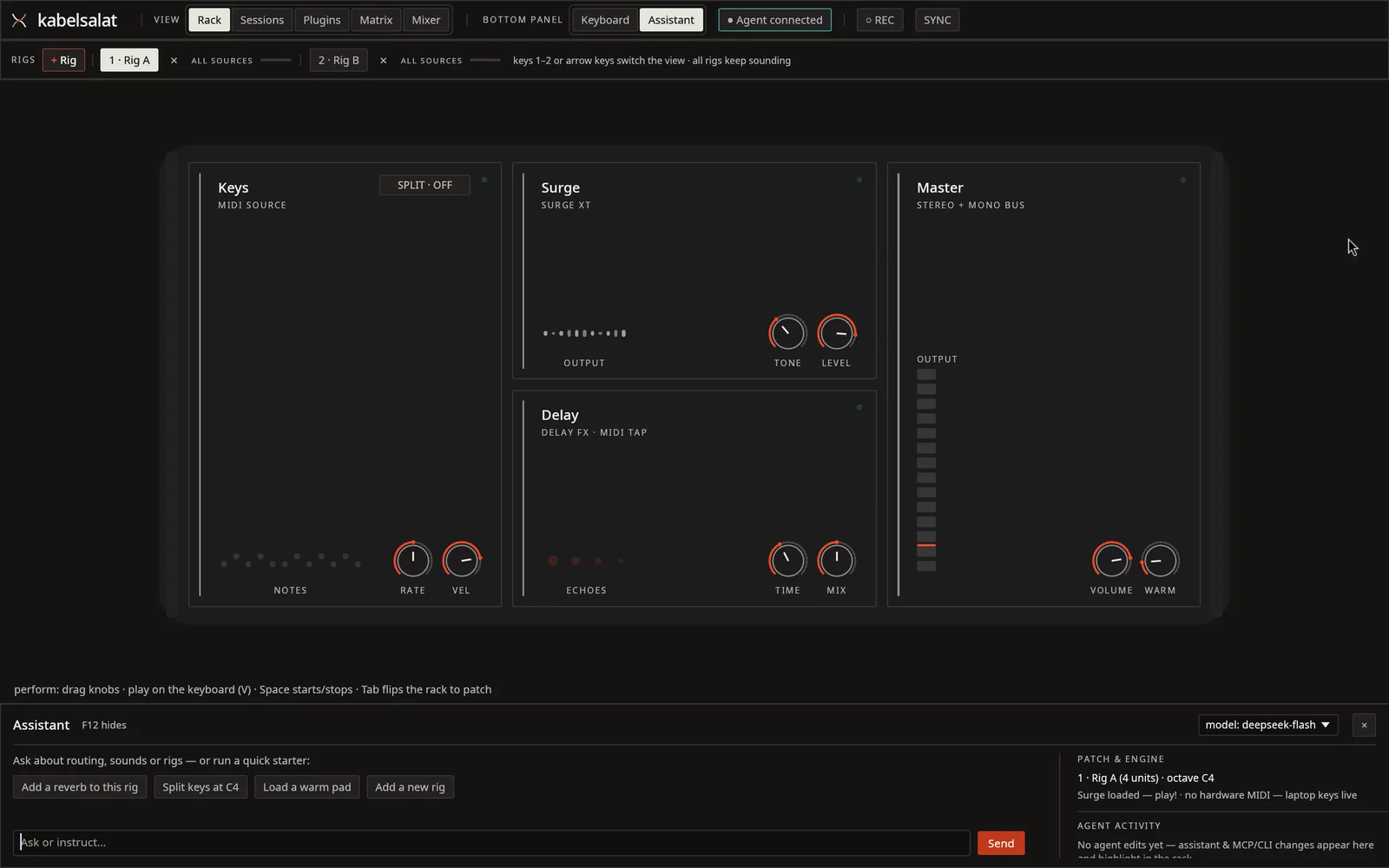
Bring one OpenRouter key (under Settings → Agent) to reach any model, with separate picks for chat, decisions and listening. Ask it to build rigs, split keys, bind CCs or dial in a patch — a live status line shows every step, and Settings → Agent lets you switch the assistant completely off if you prefer.
The assistant can even listen to the master output to judge a sound, everything it touches lights up in the rack, and Ctrl+Z undoes the whole request in one step.
Left rail & navigator
Press Q for the left rail: browse every rig, channel colour, plugin chain, saved session and rig preset in one place.
Live DSP & buffer control
Watch live DSP load and xruns in the top bar; click for Engine info to inspect per-plugin render time and change buffer size (64–2048 frames) live.
CLAP & LV2 effects
Hosts both CLAP instruments and CLAP audio effects (like Dragonfly Reverb and Airwindows Consolidated) alongside LV2 instruments, effects and MIDI FX.
Follows your desktop
Follows the Omarchy desktop theme, renders at native fractional HiDPI on Wayland, and runs with zero floating plugin windows.
Plugin catalog
22 tested plugins, organized by what they do
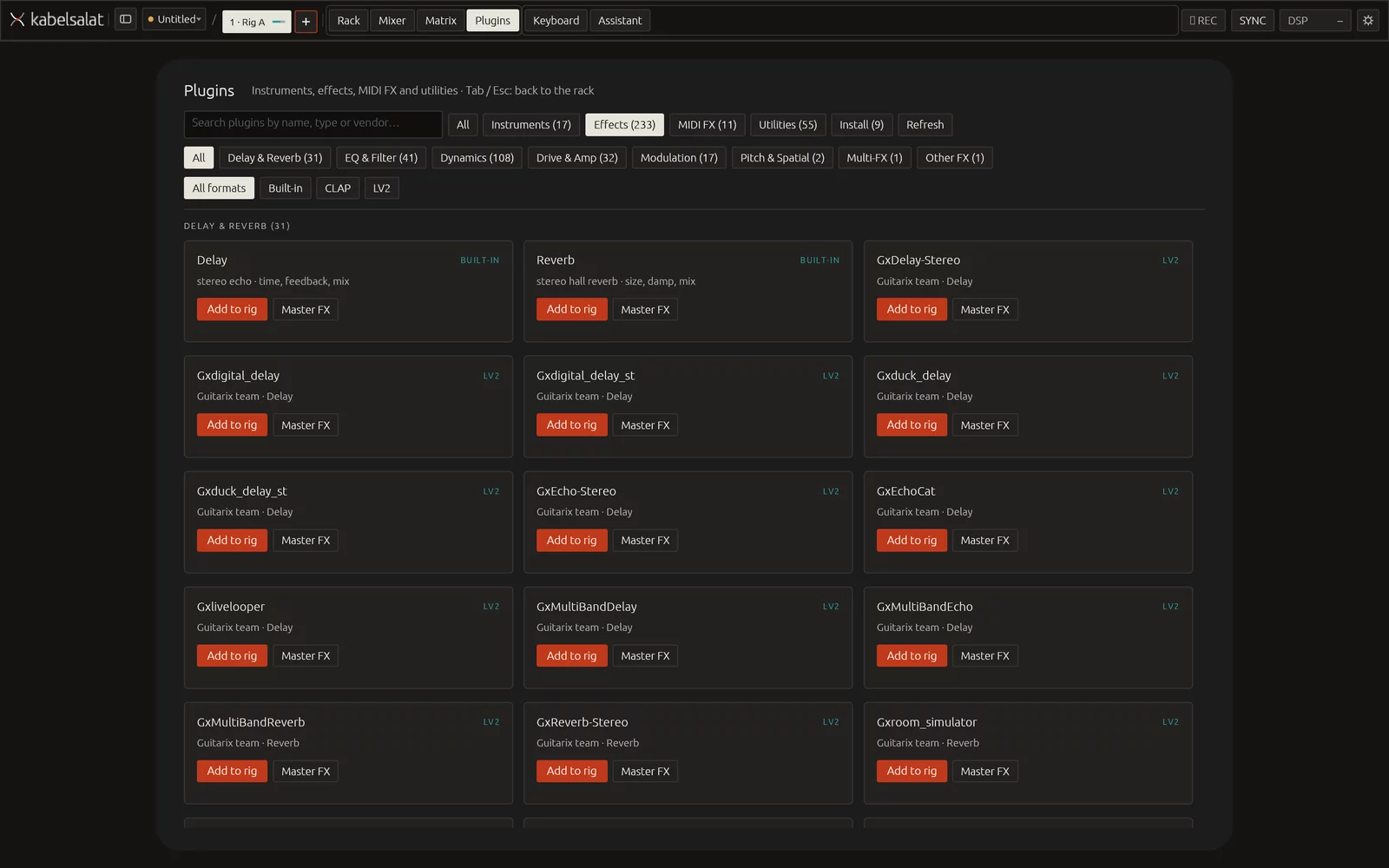
Press F9 (or B) to browse installed plugins by musical role — Instruments, Effects (with seven subcategories), MIDI FX and Utilities — or open Install to fetch 22 hand-picked, verified CLAP and LV2 plugins straight into Kabelsalat.
Includes Surge XT, setBfree, Aeolus, Dexed, Vitalium, Odin 2, OB-Xf, Ultramaster KR-106, Six Sines, JC303, Cardinal, OneTrick KEYS/CHONK/CRYPTID, AVL Drumkits, Starbreath, Floe, Guitarix, Dragonfly Reverb, Airwindows Consolidated and the 36 x42 MIDI filters.
Shortcuts
The keys you use most
Each common action has a single key. Press ? in the app for the full list.
| Key | What it does |
|---|---|
| Tab | Flip the rack between front and back |
| V / Shift+V | Open the adaptive keyboard / expand full-window instrument console |
| F9 or B | Open Plugins browser & Install catalog |
| Q | Toggle the left rail (rigs, channels, plugins & library) |
| F5 to F8 | Load a starter setup (Shift+F5 for the Guitar rig) |
| 1 to 9 | Switch the rig you are looking at (the others keep sounding) |
| Ctrl+O | Open the session popover (save, load, templates) |
| Ctrl+Z | Undo, including a whole assistant request |
| Right-click knob or fader | MIDI-learn a hardware controller CC |
| ? | Show every shortcut |
Install
Install on Linux
Prebuilt native packages ship for both x86_64 and ARM64 (Raspberry Pi 4/5, Asahi Linux, Snapdragon). The AppImage is the fastest way to get started.
AppImage (recommended)
Runs unsandboxed so it finds your system CLAP/LV2 plugins and gets realtime audio priority via rtkit. Supports delta self-updates via .zsync.
chmod +x kabelsalat-*.AppImage
./kabelsalat-*.AppImage
For CJK input methods in text fields, start with KABELSALAT_IME=1. Older versions and nightly builds are on the GitHub releases page.
Arch and Omarchy
Builds a native package with a desktop launcher entry and icon.
git clone https://github.com/ssalentin/kabelsalat.git
cd kabelsalat/packaging
makepkg -si
Recommended: surge-xt-clap (default synth). More plugins can be installed right from Plugins (F9) → Install — see the tested plugins list.
Flatpak & tarball
Both formats are attached to every GitHub release. Note that the Flatpak runs sandboxed (no host rtkit realtime priority yet, and host-side mcp --attach needs flatpak run --command=kabelsalat).
flatpak install --user kabelsalat-<version>-<arch>.flatpak
flatpak run io.github.ssalentin.kabelsalat
From source
Needs Rust (rustup), alsa-lib, lilv, and PipeWire or ALSA (plus pactl / pw-cat for system audio and multi-card bus routing).
git clone https://github.com/ssalentin/kabelsalat.git
cd kabelsalat
cargo run --release
Agents
One control plane for people and agents
The UI, the OpenRouter assistant, the CLI and the MCP server all send the same typed commands. Every UI action — from switching keyboard consoles and setting loudness targets to routing buses and loading instrument profiles — has an agent tool.
External agents such as Claude can drive the running app through the built-in MCP server, or even inspect the master mix with the listen audio judge. The top bar shows when an agent is connected and pauses it with one click.
# MCP server without a window
kabelsalat mcp

# MCP server that drives the running app
kabelsalat mcp --attach

# one-shot command from the shell
kabelsalat send '<json>'
Under the hood
How it is built
Audio engine & delay compensation
Rust, with a lock-free and allocation-free render path on a realtime thread (rtkit). Buffer size is configurable live from 64 to 2048 frames (default 256, about 5.3 ms at 48 kHz). Hardware MIDI reaches the engine from its own thread. Parallel signal paths are automatically phase-aligned with Plugin Delay Compensation (PDC), and a zero-latency master limiter sits before the master saturation.
Plugin hosting (CLAP & LV2)
CLAP instruments and audio effects run through clack, scanned in a separate process so a crashing plugin cannot take the app down, with main-thread callback/restart/flush support and foreign-CPU detection. LV2 instruments, stereo effects and MIDI FX run through lilv on a loader thread. Plugin editors are native egui panels with no floating plugin windows.
Graph, rigs & multi-output buses
Every rig is a graph of nodes and cables. The engine merges all rigs into one graph, mixes each source and rig separately, supports pre/post aux sends, and can route any rig or aux bus to up to four additional sound cards via PipeWire. Routing changes always release held notes first, checked exhaustively by verify-held-notes.
Interface & instrument consoles
egui and eframe on native Wayland with fractional HiDPI, physics-simulated cables, recessed unit rails, and four dedicated instrument consoles (Piano, Jazz Organ, Pipe Organ, Synth). One theme module follows the Omarchy desktop palette.
Testing & audio analysis
A unit suite plus CLI self-tests that run real plugins (record-test, rig-mix-test, cc-map-test, transport-test). analysis-test verifies the engine by what it actually sounds like: pitch, brightness and aliasing from spectra, master crackle, noise-proven routing, and delay compensation by cross-correlation. AGENTS.md records the rules learned from real bugs.
Inspiration and prior art
- AUM by Kymatica is the live workflow that Kabelsalat brings to Linux.
- Reason has the rack flip, with a front to play and a back to patch.
- GarageBand makes sound right away, without a manual.
- Surge XT is the reference instrument.
- Element and Carla are the existing Linux hosts.
Links
- Compatible & tested plugins (22 curated CLAP & LV2 plugins)
- Source code, MIT licensed
- Architecture and decisions
- Packaging and releases
- Changelog and releases
- Contributing. Pull requests are welcome.
More projects